pctechguide.com

  • Home
  • Guides
  • Tutorials
  • Articles
  • Reviews
  • Glossary
  • Contact

Advanced Windows Backup

Click Start, point to All Programs > Accessories > System Tools, and then click Backup.

The Backup or Restore Wizard is launched.

Wizard

Click Advanced Mode to vary the utility’s default settings, to schedule tasks or to run the Automated System Recovery Wizard.

Advanced

Tools

Click on Tools > Options to view the various classes of settings.

Click on the appropriate tab to view/change the associated settings.

Options

The Restore tab provides various options for dealing with the restoration of files that are already present in the restoration destination.

Restore

The Backup tab allows you to select from a number of different backup options:

  • Normal: This will backup all the selected files and will mark each file (its archive attribute) as having been backed up. Therefore, if you wish to perform a subsequent incremental backup only the files that have changed since a Normal backup will be copied.
  • Copy: This will copy the files you select but will not mark them as having been copied. Using this option will enable you to copy specific files while leaving your backup routine unaffected.
  • Differential: This will copy the selected files that have altered since the last normal or incremental backup. The files’ archive attributes will not be cleared.
  • Incremental: All the selected files that have altered since the last normal or incremental backup will be copied and these files archive attributes will be cleared.
  • Daily: All the selected files that have changed on that day will be copied and the files’ archive attributes will remain untouched.

Backup

The Backup Log tab allows you to control whether or not to produce a record in respect of a backup, and with what level of detail.

Backup

The Exclude Files tab allows certain, specified file types to be excluded from a backup.

Exclude

The top-level screen provides separate tabs for each of the following functions:

    • Backup

Backup

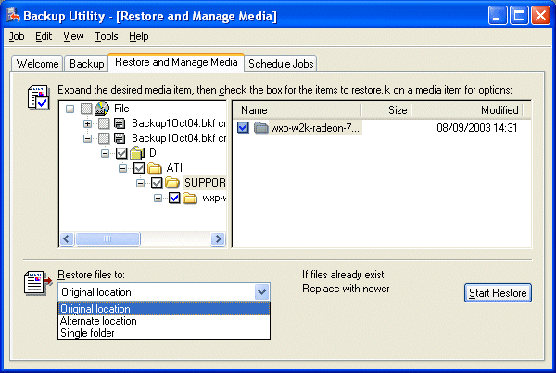
    • Restore

Restore

    • the scheduling of jobs.

Schedule

The latter requires you to specify a date when you wish it to run and, if you choose to Set Schedule …

Schedule

… a time and a frequency.

Schedule

Finally, you’ll need to authenticate yourself by providing the appropriate account password.

Authentication

Before completing the set-up of a Backup job, you’ll be invited to specify verification, compression and shadow copy options …

How

… as well as whether or not to overwrite any existing backup data in the selected storage destination and, inthe case of the latter, whether or not to restrict access to the backup file.

Backup

Relevant Microsoft Knowledge Base Articles

The following relate to the use of the Windows Backup utility in Advanced mode.

  • 320820: How to Use the Backup Utility to Back Up Files and Folders in Windows XP Home Edition
  • 308422: How To Use Backup to Back Up Files and Folders on Your Computer in Windows XP
  • 309340: How to use Backup to restore files and folders on your computer in Windows XP
  • 307072: Computer Stops Responding During Snap Phase of System State Backup
  • Windows Backup Installation
  • Windows Backup In Action
  • Windows Backup Restoration
  • Advanced Windows Backup


All Posts

Filed Under: How To Use the Windows Backup Utility

Latest Articles

Handheld Applications

In the early days PDAs came with some variation on the set of familiar PIM applications, perhaps with a couple of games thrown in. The traditional PIM functionality has matured and grown in sophistication of the years, and continues to be present today. In addition to some form of … [Read More...]

How to Remove XP Internet Security 2012

Easiest Removal Option: Remote Repair: Paying an expert to remove this threat is always the easiest option. It's also the most expensive. PCTechGuide.com has reviewed several remote computer repair companies and we recommend http://www.pcninja.com This is a small computer repair company (Two … [Read More...]

Registry Booster 2011 Review

PC Mechanic 2016

The biggest news about Registry Boost is it's now called PC Mechanic 2015. This was most likely done because over the years registry cleaners have evolved into PC optimization tools. They are not so much about cleaning out the registry but more about PC optimization PROS: As a stand alone … [Read More...]

Why Internet Bundles Are the Next Battleground for Gamers

A weak internet connection can turn seamless gaming sessions into frustrating experiences filled with lag, buffering or sudden disconnects. For … [Read More...]

Importance of Inbound Marketing in the Digital Age

A couple of months ago, Zacks reported that Hubspot was starting to make some major changes to its inbound marketing strategy. They talk a lot about … [Read More...]

Damage Control Strategies for Resolving Online PR Crises

Last July, Astrologer faced a major crisis after its CEO went viral at a ColdPlay concert when having an affair. This was just one of the many times a … [Read More...]

AI is Not Killing Computer Jobs Like Doomers Projected

There is no denying the reality that AI technology has played a massive role in disrupting our lives. A growing number of people claim that AI … [Read More...]

Everything You Need to Know About Sourcing Circuit Boards From U.S. Suppliers

In This Article This article includes: Why Source PCBs From the United States?How to Get a Quote From a U.S.-Based PCB ManufacturerThe Top U.S. … [Read More...]

Top Taplio Alternatives in 2025 : Why MagicPost Leads for LinkedIn Posting ?

LinkedIn has become a strong platform for professionals, creators, and businesses to establish authority, grow networks, and elicit engagement. Simple … [Read More...]

Guides

  • Computer Communications
  • Mobile Computing
  • PC Components
  • PC Data Storage
  • PC Input-Output
  • PC Multimedia
  • Processors (CPUs)

Recent Posts

How To Create A Windows Start Up Disk

You're going to need a Windows 98 Startup Disk to partition and format your PC's hard drive and then to provide CD-ROM support for the re-installation … [Read More...]

Synology America DiskStation 2-Bay Network Attached Storage

  Many companies and individuals are looking for an efficient way to share files on a network. They may lack the technical skills to implement … [Read More...]

How Does a Virus Impact my Computer?

… [Read More...]

[footer_backtotop]

Copyright © 2026 About | Privacy | Contact Information | Wrtie For Us | Disclaimer | Copyright License | Authors