pctechguide.com

  • Home
  • Guides
  • Tutorials
  • Articles
  • Reviews
  • Glossary
  • Contact

Handheld Applications

In the early days PDAs came with some variation on the set of familiar PIM applications, perhaps with a couple of games thrown in. The traditional PIM functionality has matured and grown in sophistication of the years, and continues to be present today. In addition to some form of handwriting recognition software, the following is a super-set of the PIM software to be found on the palm-size, stylus-based class of PDA device:

  • Diary/scheduler
  • To-do list
  • Phone/address book
  • Notepad
  • Drawing application
  • Finance software
  • Calculator
  • Organizer
  • Alarms
  • World time
  • File manager
  • Voice recorder
  • Data synchronization
  • Printer connection.

In addition, the following Web applications have become standard offerings. Thanks to the recent developments in communications technology this functionality is now possible via wireless connection to the Internet:

  • Email
  • Web browser.

In addition, keyboard-based designs may additionally come with cut-down versions of the following desktop applications:

  • Word processor
  • Spell checker
  • Custom dictionary
  • Spreadsheet.

The explosion in the PDA market in the late 1990s has resulted in the development of all manner of third-party applications aimed at both the consumer and corporate sectors. One of the most interesting new areas of development – both because of its inherent applicability to the mobile user and because it is an excellent example of the exploitation of converging technologies – are the various route planning and journey tracking systems now available.

Combining the power and convenience of PDA devices with the intelligence and precision of a Global Positioning System (GPS), these packages allow users to plan their trip, customise maps and directions, and track their progress, whether they’re traveling by land, sea or air, whatever their mode of transport.

The Route Planner application – developed by UK-based Palmtop Software and available for all three rival OS platforms – is a good example of what’s on offer. The user indicates the required journey, either by pointing and clicking on a map or by entering the names of the start and destination points. Particular places of interest – or places to be avoided – can be entered before the route is calculated.

Any section of the road map can be displayed at any scale, and at any level of detail. Location names, routes, legends, locators and scales can be displayed in a variety of ways. Similarly, driving instructions can be displayed in several natural language formats and at different levels of detail. When used in conjunction with a compatible GPS satellite receiver, the traveler’s position on the map will be updated as they move. A split view allows progress along the route to be viewed at the same time as displaying the driving instructions.
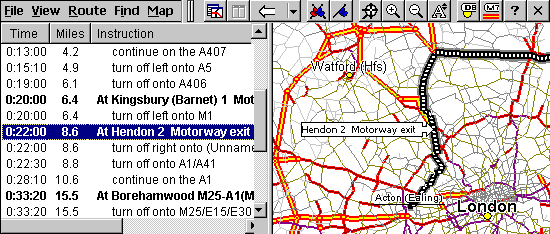
Route

Future mobile technologies are likely to have a major impact on lifestyles, both at work and play. Mobile banking and shopping can already be quite happily achieved on a small screen and, with an expected one billion mobile phone users by 2003, by then there may be as many people surfing the web via a mobile handset or mobile-enabled PDA as from their desktop – perhaps not for general-purpose Web surfing, but rather for accessing specialized Internet services like stock quotes, weather, maps and sports scores.

  • Handheld Organizer origins
  • Handheld Evolution
  • Palm Pilot
  • Handheld Operating Systems
  • Handwriting Recognition
  • Handheld Synchronization
  • Handheld Applications
  • Guide to UMPCs – Ultra Mobile Personal Computers

Filed Under: PDA's and Other Handhelds

Latest Articles

What to Do When Tech Isn’t for You

We live in a world dominated by technology — this website makes for excellent evidence. Tech is everywhere; it’s how we do work, how we play, how we communicate and more. That means if you aren’t so good at tech — if technology-related concepts and activities simply don’t come easily to you — you … [Read More...]

CD-ROM Photo CD

Photo CD has been specified by Kodak and Philips based on the CD-i Bridge specification. It comprises the following: General Disc format including example of program area layout, index table, volume descriptor, data area, subcode Q-channel … [Read More...]

Make Facebook Secure With These Steps

People love Facebook. They spend hours on this social website keeping up with friends and telling the world about what they have been doing. But, many people do not realize the security risks associated with using the site. They just enjoy using it and do not realize the implications of what a … [Read More...]

Top Taplio Alternatives in 2025 : Why MagicPost Leads for LinkedIn Posting ?

LinkedIn has become a strong platform for professionals, creators, and businesses to establish authority, grow networks, and elicit engagement. Simple … [Read More...]

Shocking Cybercrime Statistics for 2025

People all over the world are becoming more concerned about cybercrime than ever. We have recently collected some statistics on this topic and … [Read More...]

Gaming Laptop Security Guide: Protecting Your High-End Hardware Investment in 2025

Since Jacob took over PC Tech Guide, we’ve looked at how tech intersects with personal well-being and digital safety. Gaming laptops are now … [Read More...]

20 Cool Creative Commons Photographs About the Future of AI

AI technology is starting to have a huge impact on our lives. The market value for AI is estimated to have been worth $279.22 billion in 2024 and it … [Read More...]

13 Impressive Stats on the Future of AI

AI technology is starting to become much more important in our everyday lives. Many businesses are using it as well. While he has created a lot of … [Read More...]

Graphic Designers on Reddit Share their Views of AI

There are clearly a lot of positive things about AI. However, it is not a good thing for everyone. One of the things that many people are worried … [Read More...]

Guides

  • Computer Communications
  • Mobile Computing
  • PC Components
  • PC Data Storage
  • PC Input-Output
  • PC Multimedia
  • Processors (CPUs)

Recent Posts

How Do You Put Picasso in PCs?

It's abundantly clear that the ever increasing quality of computer graphics has proved central to the success of the computer at home and in … [Read More...]

Avasoft Antivirus Professional Removal

Avasoft Antivirus Professional is a malware client that attempts to extort money from it's victims. This computer virus comes from a long family of … [Read More...]

Business Analytics Masters: What You Should Know

Business analysts play a vital role in the development and future of different organizations and business. In general, they act as a bridge between … [Read More...]

[footer_backtotop]

Copyright © 2026 About | Privacy | Contact Information | Wrtie For Us | Disclaimer | Copyright License | Authors