pctechguide.com

  • Home
  • Guides
  • Tutorials
  • Articles
  • Reviews
  • Glossary
  • Contact

Pentium 4 CPU

Your Pentium 4 motherboard should include a manual with installation instructions. Consult both this and any documentation that came with your Pentium 4 processor.
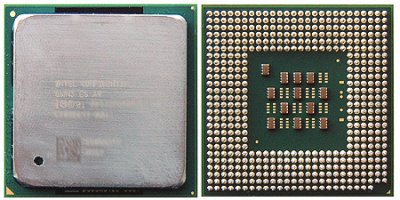
Pentium

The Pentium 4 uses a FC-PGA2 packaging. While the Integrated Heat Spreader (IHS) affords good protection to the CPU itself, the pins on the underside are fragile and easily bent, so the chip needs to be handled with care.

Assembly

The CPU chip is designed to fit the Socket 478 form factor.

Note that motherboards intended for Pentium 4 CPUs have a special processor retention mechanism, attached via four pushpins surrounding the processor socket.


The release of the first Pentium 4 in late 2000 coincided with the latest on Intel’s socket line-up, namely Socket 423. Indicative of the trend for processors to consume ever decreasing amounts of power, the PGA-style Socket 423 had a VRM operational range of between 1.0V and 1.85V.

However, Socket 423 had been in use for only a matter of months when Intel muddied the waters still further with the announcement of the new Socket 478 form factor. The principal difference between this and its predecessor was that the newer format socket featured a much more densely packed arrangement of pins known as an FC-PGA2 interface. Also referred to as a micro Pin Grid Array (µPGA), this allows both the size of the CPU itself and the space occupied by the interface socket on the motherboard to be significantly reduced.

Socket 478 was introduced to accommodate the 0.13-micron Pentium 4 Northwood core, launched at the beginning of 2002.

Open

Pull the socket handle sideways away from the socket and then raise the lever up to a 90-degree angle.

Align

Carefully align the processor using the gold arrow markings on substrate of the FC-PGA2 package and the socket for reference. This should point towards the lever pivot. The CPU will only fit in the correct orientation.

Close

Taking care not to bend any of the processor pins, carefully insert the processor into the socket. Hold the CPU down firmly with one hand and close and secure the socket lever with the other.

Processor

The sticker on the box of the boxed processor (that has the processor speed information, test specification, and lot number) can be removed and placed on the inside of the system chassis that the processor is installed into. This will allow quick access to the information that is no longer available on the top of the processor when the heatsink is installed.

  • Pentium 4 CPU
  • Pentium 4 Fan
  • Pentium 4 PSU
  • Pentium 4 Memory
  • Pentium 4 Removal

Filed Under: How to Install a Pentium 4 CPU

Latest Articles

DVD OSTA

The Optical Storage Technology Association (OSTA) is an association-not a standards body-and its members account for more than 80 percent of all worldwide writable optical product shipments. Its specifications represent a consensus of its … [Read More...]

Video Tutorials for Anyone Wanting to Learn About Big Data

Did you know that we create about 2.5 quintillion bytes of data every single day? There is no denying the fact that big data is changing our world in astonding ways. If you are interested in learning more about big data, there are some amazing videos that can help. The best we have come across … [Read More...]

Using Antivirus Reviews to Protect Your System

If you type the word “antivirus” into a web browser, you'll see a nearly limitless list of products asking for your money in exchange for antivirus protection. Now, we all know that having an antivirus program is one of the most important steps for any PC owner, but it isn't as cut and dry … [Read More...]

Comments

  1. Mohammedsultans041 says

    February 9, 2012 at 6:44 am

    ist very gooooooooooood,,,,,,,

Why Internet Bundles Are the Next Battleground for Gamers

A weak internet connection can turn seamless gaming sessions into frustrating experiences filled with lag, buffering or sudden disconnects. For … [Read More...]

Importance of Inbound Marketing in the Digital Age

A couple of months ago, Zacks reported that Hubspot was starting to make some major changes to its inbound marketing strategy. They talk a lot about … [Read More...]

Damage Control Strategies for Resolving Online PR Crises

Last July, Astrologer faced a major crisis after its CEO went viral at a ColdPlay concert when having an affair. This was just one of the many times a … [Read More...]

AI is Not Killing Computer Jobs Like Doomers Projected

There is no denying the reality that AI technology has played a massive role in disrupting our lives. A growing number of people claim that AI … [Read More...]

Everything You Need to Know About Sourcing Circuit Boards From U.S. Suppliers

In This Article This article includes: Why Source PCBs From the United States?How to Get a Quote From a U.S.-Based PCB ManufacturerThe Top U.S. … [Read More...]

Top Taplio Alternatives in 2025 : Why MagicPost Leads for LinkedIn Posting ?

LinkedIn has become a strong platform for professionals, creators, and businesses to establish authority, grow networks, and elicit engagement. Simple … [Read More...]

Guides

  • Computer Communications
  • Mobile Computing
  • PC Components
  • PC Data Storage
  • PC Input-Output
  • PC Multimedia
  • Processors (CPUs)

Recent Posts

Audio Sampling and Recording Techniques Explained

When a sound card records analogue audio, it is converting the sound waveform into digital information and then copying this … [Read More...]

CD-ROM Photo CD

Photo CD has been specified by Kodak and Philips based on the CD-i Bridge specification. It comprises the … [Read More...]

Monitoring in Machine Learning Part 1: Potential Pitfalls

In this article of the Machine Learning Operations series we will see in detail what monitoring a Machine Learning model consists of. So let's get … [Read More...]

[footer_backtotop]

Copyright © 2026 About | Privacy | Contact Information | Wrtie For Us | Disclaimer | Copyright License | Authors