pctechguide.com

  • Home
  • Guides
  • Tutorials
  • Articles
  • Reviews
  • Glossary
  • Contact

How to Install a Pentium 4 CPU

This tutorial will take you through the steps involved in installing one of the current 800MHz system bus, dual-channel DDR capable Pentium 4 processors, covering each of the following:

  • installing the CPU
  • installing the fan/heatsink assembly
  • connecting the power supply
  • installing dual-channel memory.

The tutorial also covers the rather tricky procedure for subsequently removing the special Intel-provided fan/heatsink assembly.

Pentium 4 performance received a significant boost in the spring of 2003, when the fastest system bus speed was increased from 533MHz to 800MHz. By providing support for dual-channel DDR400 memory, the new i875P/i865 chipset platform – announced at the same time – provided the increased memory bandwidth architecture necessary for the faster system bus to be fully exploited, the 6.4GBps of bandwidth this provides being perfectly balanced with the 800MHz FSB.
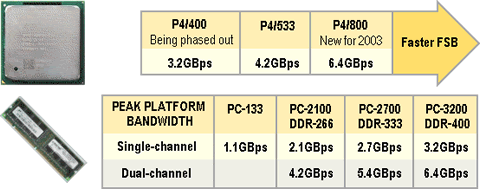
Balanced Bandwidth

Confusion can be caused by the use “FSB” and “system bus” terminology. Ever since the introduction of Intel’s Dual Independent Bus (DIB) architecture in 1997 it has been common for both terms to be used interchangeably. Sometimes, however, you may see current Pentiums 4s being described as having a 200MHz FSB and – by virtue of the “Quad Pumped” data transfer rates (which mean that data can be sent 4x per clock cycle) – an 800Mz system bus.

  • Pentium 4 CPU
  • Pentium 4 Fan
  • Pentium 4 PSU
  • Pentium 4 Memory
  • Pentium 4 Removal

Hardware Upgrades | PC Maintenance | PC Troubleshooting | PC Customization | PC Leisure

Top Taplio Alternatives in 2025 : Why MagicPost Leads for LinkedIn Posting ?

LinkedIn has become a strong platform for professionals, creators, and businesses to establish authority, grow networks, and elicit engagement. Simple … [Read More...]

Shocking Cybercrime Statistics for 2025

People all over the world are becoming more concerned about cybercrime than ever. We have recently collected some statistics on this topic and … [Read More...]

Gaming Laptop Security Guide: Protecting Your High-End Hardware Investment in 2025

Since Jacob took over PC Tech Guide, we’ve looked at how tech intersects with personal well-being and digital safety. Gaming laptops are now … [Read More...]

20 Cool Creative Commons Photographs About the Future of AI

AI technology is starting to have a huge impact on our lives. The market value for AI is estimated to have been worth $279.22 billion in 2024 and it … [Read More...]

13 Impressive Stats on the Future of AI

AI technology is starting to become much more important in our everyday lives. Many businesses are using it as well. While he has created a lot of … [Read More...]

Graphic Designers on Reddit Share their Views of AI

There are clearly a lot of positive things about AI. However, it is not a good thing for everyone. One of the things that many people are worried … [Read More...]

Guides

  • Computer Communications
  • Mobile Computing
  • PC Components
  • PC Data Storage
  • PC Input-Output
  • PC Multimedia
  • Processors (CPUs)

Recent Posts

Guidelines on Troubleshooting Python Code

Whenever we write a computer program we need to verify that it works as expected. Usually we execute the code, if necessary we provide some inputs, … [Read More...]

Number Systems 2

Decimal The difficult for us when approaching computer number systems is that we're conditioned in to counting with our familiar base 10 system, … [Read More...]

Fix Frozen Tabs in Chrome

The browser is our window to the Internet. And, since so much of our lives are spent on the Internet, it is important to have a good, reliable … [Read More...]

[footer_backtotop]

Copyright © 2026 About | Privacy | Contact Information | Wrtie For Us | Disclaimer | Copyright License | Authors