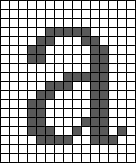
When a page of text is scanned into a PC, it is stored as an electronic file made up of tiny dots, or pixels; it is not seen by the computer as text, but rather, as a picture of text’. Word processors are not capable of editing bitmap images. In order to turn the group of pixels into editable words, the image must go through a complex process known as Optical Character Recognition (OCR).
OCR research began in the late 1950s, and since then, the technology has been continually developed and refined. In the 1970s and early 1980s, OCR software was still very limited – it could only work with certain typefaces and sizes. These days, OCR software is far more intelligent, and can recognise practically all typefaces as well as severely degraded document images.
One of the earliest OCR techniques was something called matrix, or pattern matching. Most text is either in Times, Courier, or Helvetica typefaces in point sizes between 10 and 14. OCR programs which use the pattern matching method have bitmaps stored for every character of each of the different font and type sizes. By comparing a database of stored bitmaps distributed to the bitmaps of the scanned letters the program attempts to recognise the letters. This early system was only really successful using non-proportional fonts like Courier where letters are spaced regularly and are easier to identify. Complex multi-font documents were well beyond its scope and an obvious limitation to this method is that it is only useful for the fonts and sizes stored (learn more info here).
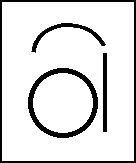
Feature extraction was the next step in OCR’s development. This attempted to recognise characters by identifying their universal features, the goal being to make OCR typeface-independent. If all characters could be identified using rules defining the way that loops and lines join each other, then individual letters could be identified regardless of their typeface. For example: the letter a is made from a circle, a line on the right side and an arc over the middle. The arc over the middle is optional. So, if a scanned letter had these features it would be correctly identified as the letter a by the OCR program.
In terms of research progress, feature extraction was a step forward from matrix matching, but actual results were badly affected by poor-quality print. Extra marks on the page, or stains in the paper, had a dramatic effect on accuracy. The elimination of such noise became a whole research area in itself, attempting to determine which bits of print were not part of individual letters. Once noise can be identified, the reliable character fragments can then be reconstructed into the most likely letter shapes.
No OCR software ever recognises 100% of the scanned letters. Some OCR programs use the matrix/pattern matching and/or feature extraction methods to recognise as many characters as possible – and complement this by using spell checking on the hitherto unrecognised letters. For example: if the OCR program was unable to recognise the letter e in the word th~ir, by spell checking th~ir the program could determine the missing letter is an e.
Recent OCR technology is far more sophisticated than the early techniques. Instead of just trying to identify individual characters, modern techniques are able to identify whole words. This technology, developed by Caere, is called Predictive Optical Word Recognition (POWR).
Using higher levels of contextual analysis, POWR is able to virtually eliminate the problems caused by noise. It enables the computer to sift through the thousands or millions of different ways that dots in a word can be assembled into characters. Each possible interpretation is then assigned a probability, and the highest one is selected. POWR uses sophisticated mathematical algorithms which allow the computer to hone in on the best interpretation without examining each possible version individually.
When probabilities are assigned to individual words, all kinds of contextual information and evidence is taken into account. The technology makes use of neutral networks and predictive modelling techniques taken from research in Artificial Intelligence (AI). These involve extensive use of experts – algorithms set up to be specialists in various areas of character recognition. One expert might know a great deal about font styles, another about dictionary information, another about the degradation caused by faxes. By combining the use of expert systems with modelling techniques taken from Cognitive Science, a mathematical, probabilistic infrastructure can be created that dynamically investigates all the different possibilities of characters that make up a word in question by querying a variety of experts, and generating an initial set of general hypotheses. The evidence for and against each hypothesis is weighed and a probability assigned to each hypothesis. The investigation continues until a clear and compelling answer emerges. At each stage in the investigation, a new set of experts is selected based on the relevance of their areas of expertise to the particular situation and their histories of success in similar situations.
The net result is that POWR is able to identify words in a way which more closely resembles human visual recognition. In practice, the technique significantly improves the accuracy of word recognition across all document types. All the possible interpretations of a word are assessed by combining all sources of evidence, from low-level pixel-based information to high-level contextual clues. The most probable interpretation is then selected.
Although OCR systems have been around for a long time, their benefits are only just being appreciated. The first offerings were extremely costly, in terms of software and hardware, and they were inaccurate and difficult to use. Consequently many of the early adopters became frustrated with the technology. Over the past few years, however, OCR has been completely transformed. Modern OCR software is highly accurate, easy to use and affordable and for the first time OCR looks set to be adopted in all kinds of work environments on a mass scale.
Unless there is a specific need to preserve colour information from the original document, its best to scan documents for OCR in greyscale. This uses a third of the space of an RGB colour scan. Line art mode makes for even smaller file sizes – but this often loses detail, reducing the accuracy of subsequent OCR processing.