Easiest Removal Option:
Remote Repair: Paying an expert to remove this threat is always the easiest option. It’s also the most expensive. PCTechGuide.com has reviewed several remote computer repair companies and we recommend http://www.pcninja.com This is a small computer repair company (Two brick and motar stores in California ). Small companies like this tend to deliver better customer service. With a fully trained and experienced staff all based in California doing the repairs, you can’t go wrong. The cost for most virus removal services is around $99 USD.
Software Option:
Antivirus Clients: Anti-Virus software was developed to remove these exact kind of threats. Most people who get infected with malware get infected from having no protection or from using a free client that offered no real up front protection. It’s important to secure your computer so know one gains access to it and to protect your identity online.
PCTechGuide.com has reviewed hundreds of software vendors over the years. See our Antivirus Reviews and Internet security reviews for full in-depth reviews.
To Remove this virus we recommend Spyware Doctor with Antivirus or Malwarebytes. All three offer good results in most cases.
Do It Yourself Removal Guide
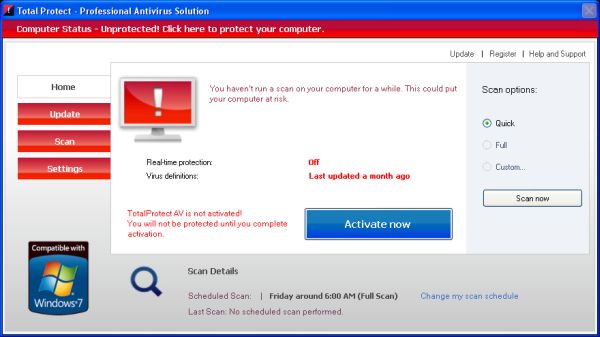
How to remove Total Protect DIY Steps
Proceed with Caution. PCTechGuide.com offers this information free of charge. We can not be held liable for any actions you take regarding the below information. While conducting the necessary steps for a complete Total Protect removal it is recommended to backup your data in order to avoid any unexpected incidents that could result from severe operating system damage.
Additionally, once the manual procedures have been completed we encourage you to start a full system scan using legitimate antivirus software such as Spyware Doctor with Antivirus or Stopzilla. In case removal seems too difficult to manage or if you do not have the necessary experience it is advisable to request the service of an online computer repair site such as http://www.pcninja.com.
Step 1. You need to stop the Total Protect main executable file from execution before proceeding with any other action. By doing so Total Protect will no longer run and most of its malicious features will be disabled. Follow the next steps in order to terminate Total Protect process:
A. Reboot your PC and boot the operating system into Safe Mode with Networking. Once in Safe Mode, Total Protect will no longer run, reason why it will be possible to simply delete its main executable file from disk. Below you can find the main executable path for this threat, according to different operating system versions.
XP: Total Protect executable path:
C:Documents and Settings%User Name%Application DataRtlDriver32.exe
Win 7 / Vista: Total Protect executable path:
C:Users%User Name%AppDataRoamingRtlDriver32.exe
B. Browse to the executable path indicated above rename the Total Protect executable to a different file name and restart the computer. Once the computer has been restart Total Protect will no longer run anymore. At this point it is possible to delete the file from disk and disable the threat.
C. Once you are browsing the executable path in which Total Protect is installed, sort the contents by last modified date. By doing so the latest files added to this folder will be displayed first in order of appearance. In most cases, you will be able to easily identify the Total Protect executable based on the indicated file name and delete it from disk.
D. Open up the Task Manager and examine the list of running processes in order to identify the executable. Once identified, stop it from execution and browse to the Total Protect folder path indicated in this article. Delete Total Protect executable from disk to stop this threat from execution.
Step 2. Delete Total Protect executable file if you have not already done so. Please keep in mind that this process will have to be stopped from execution before you will be able to remove it from disk as it is not possible to delete files that are in use. Once deleted, reboot the PC in order to make sure that Total Protect is no longer running.
Step 3. Run an antivirus scan using a legitimate security client provided by a well known company. We recommend using the free trial versions of Spyware Doctor with Antivirus. The free client allows you to scan the entire PC in order to identify any possible threats that may be still present. In order to clean the actual threats found it will be required to purchase the antivirus software that suits you best. Keep in mind that it is always a good idea to have a paid antivirus client running on your PC in order to avoid this type of problem in the future.
How not to Get Infected Again
In most cases users get infected with viruses and malware from not having propper up-front protection. Computer security experts recommend that you use an anti-virus client that offers up front protection to block viruses from installing and a security client that keeps up to date with the latest virus defenitions. The paid versions of Spyware Doctor with Antivirus and Malwarebytes fit this criteria. Going with one of these clients is a step in the right direction to protecting your computer.
Need More Help? Want to Say Thanks?
Ask questions or post your comments below. Thank You.
Discalimer: PCTechGuide.com does make money from users who make a purchase of many of the products and services featured on this website