As with most specifications in the computer world, the original SCSI (pronounced scuzzy) specification was completed (in 1986) after work had already begun on a better version (SCSI-2). It was developed as a result of attempts by Shugart and NCR to develop a new interface for minicomputers. The basis of the interface was, and still is, the set of commands that control data transfer and communication among devices. The commands were the strength of SCSI, because they made the interface intelligent; but they were also its initial weakness, as there wasn’t enough of a standard for the command set to be truly useful to device manufacturers. Consequently, in the mid-1980s, the Common Command Set (CCS) extension was developed to standardise SCSI commands.
SCSI, like EIDE, is a bus which controls the flow of data (I/O) between the computer’s processor and its peripherals, the most common of which is the hard drive. Unlike EIDE, SCSI requires an interface to connect it to a PC’s PCI or ISA bus. This isn’t a controller: it’s correctly called a host dapter. The actual controllers are built into each SCSI device. They chain SCSI peripherals to the SCSI bus via the host adapter.
SCSI’s most obvious strength is the number of devices it can control. Whereas IDE interfaces are restricted to two disk drives, and today’s EIDE interfaces to four devices, which can include hard disks and CD-ROM drives, a SCSI controller can handle up to eight devices (including the host adapter card, which counts as a device). Furthermore, the device can vary from hard disks and CD-ROM drives, to CD-Rs, optical drives, printers, scanners, media changers, network cards and much more.
Each device on the chain, including the host, must be identified by a unique ID number. One SCSI device must not use the same ID number as another, but they may be numbered non-sequentially. Most SCSI host adapters feature external and internal connectors, with the option for the chain to extend in either or both directions. There’s no relationship between the IDs and the physical position on the bus, but both ends must be electrically terminated with resistors to prevent signal reflections and guarantee data integrity over long cable lengths. Termination comes in several varieties, from physical jumpers or plugs to software configurations.
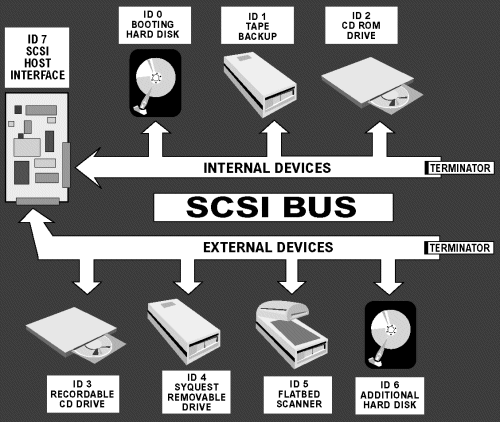
Vanilla SCSI supports up to eight devices, using ID numbers 0 to 7. The controlling host adapter traditionally occupies ID 7 and boots the operating system from the device with the lowest ID number. Most SCSI systems set the boot hard drive at ID 0, leaving IDs 1 to 6 free for other non-booting devices. When a SCSI system starts up, all the devices on the bus are listed along with their ID number.
The SCSI host adapter takes up a hardware interrupt request line (IRQ), but the devices attached to the card don’t, which significantly increases expandability. In fact, it’s possible to add a second SCSI card for seven additional devices. Better still, a twin-channel SCSI card takes up only one IRQ and handles up to 15 peripheral devices.
- What Is The System Bus?
- ISA Bus – Industry Standard Architecture
- Local Bus Interfaces
- PCI Bus Interfaces
- What is AGP and AGP Pro?
- Internal Interfaces Summary
- PCI-X Interfaces
- PCI Express Interfaces
- IDE Interfaces
- EIDE Interfaces
- Hard Disks – What IS ATA and Ultra ATA?
- Serial ATA (SATA) interface guide
- SCSI Explained – With Pictures
- SCSI Interface Evolution
- Fibre Channel Interfaces
- Hard Disks – What is Serial Storage Architecture?
- I/O Interface Standards
- How It Works: The Idea and Technology Behind USB
- IEEE 1394 Interfaces
- USB 2.0 Intefaces
- FireWire 800 Interfaces