pctechguide.com

  • Home
  • Guides
  • Tutorials
  • Articles
  • Reviews
  • Glossary
  • Contact

Trackballs

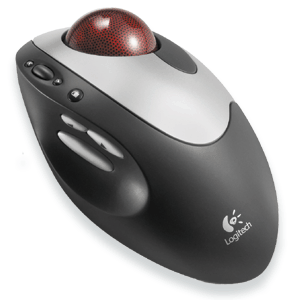
A trackball is a pointing device consisting of a ball housed in a socket containing sensors to detect rotation of the ball about two axes – like a mouse lying on its back. The cursor is moved about the screen by a user rolling the ball with their thumb, fingers, or the palm of their hand. There are usually one to three buttons next to the ball, which are in the same way as mouse buttons.

The principal advantages of trackballs over mice is that since it is stationary, it requires less space to use, and it can be operated on any type of surface, including the user’s lap. These attributes make a trackball particularly suitable for use with portable computers, and they were widely used on laptop PCs before the advent of the touchpad. A further benefit is that because there is no need to physically move the device around, they offer ergonomic relief from Repetitive Strain Injury (RSI) and Carpal Tunnel Syndrome (CTS).

Like traditional mice, trackballs can be communicate with a PC through serial or USB connections, or in the case of wireless mice, via infrared or radio frequency.

The result of more than four years’ research in the 1990s, the principle of Logitech’s Marble Optical Technology is based on the optical measurement of movement, whereby a camera assesses the degree of shift between successive snapshots. Like Microsoft’s IntelliEye technology, the system essentially functions in a similar way to the eye, with the entire evaluation taking place within the sensor.

When the user rotates the patterned ball of a Marble trackball, an image of the ball, illuminated by a pair of LEDs, passes through a lens focused on the Marble sensor, where it is sampled 1000 times per second. The sensor is composed of 93 small cells working independently as a neural network. Each of them can detect a unitary motion by sharing information with its direct neighbours, similar to the way a human eye operates. The sensor then computes the average of the displacement returned by all these individual cells for successive samples and passes this information to a microprocessor in the trackball. This transmits this information to the host computer, either via a cable or a wireless communications protocol in the case of a cordless device. The trackball driver software then renders the cursor on the screen.
Logitech

This system of collective computation makes for a highly reliable system. If any part of the sensor is obstructed because of dirt on the window, a scratch, or any other reason, the impact on the result of the collective calculation will be negligible. The system is also very independent of the light quantity or uniformity reaching the sensor ball, further increasing its robustness.

  • Keyboards
  • Ergonomic Keyboards
  • Opto-Mechanical mice
  • Optical Mice
  • Cordless Input Devices
  • Laser Mice
  • Trackballs
  • Joysticks
  • Input Device Interfaces
  • Touchscreens

Filed Under: Input Devices

Latest Articles

Hard Disk MicroDrives

GMR technology was a key feature of IBM's (the company's hard disk drive business was subsequently acquired by Hitachi Global Storage Technologies in 2002) revolutionary Microdrive device, launched in mid-1999. The world’s smallest, lightest one-inch hard drive was invented at … [Read More...]

Protecting Your Email Account

Email is a crucial application in today's world. It is just as important for personal reasons as it is for business. It is essential in communicating with other people, signing up for events, managing memberships and a host of other reasons. But, email also has security issues if it is not properly … [Read More...]

Why Drupal Accessibility is Vital for Your Website

Drupal may not be as popular as WordPress, but it is still used in over 1 million websites. The Internet might be more conducive to our needs if more sites were compatible with it. One of the benefits of investing Drupal is that it can provide a better user experience for disabled people. There … [Read More...]

Importance of Inbound Marketing in the Digital Age

A couple of months ago, Zacks reported that Hubspot was starting to make some major changes to its inbound marketing strategy. They talk a lot about … [Read More...]

Damage Control Strategies for Resolving Online PR Crises

Last July, Astrologer faced a major crisis after its CEO went viral at a ColdPlay concert when having an affair. This was just one of the many times a … [Read More...]

AI is Not Killing Computer Jobs Like Doomers Projected

There is no denying the reality that AI technology has played a massive role in disrupting our lives. A growing number of people claim that AI … [Read More...]

Everything You Need to Know About Sourcing Circuit Boards From U.S. Suppliers

In This Article This article includes: Why Source PCBs From the United States?How to Get a Quote From a U.S.-Based PCB ManufacturerThe Top U.S. … [Read More...]

Top Taplio Alternatives in 2025 : Why MagicPost Leads for LinkedIn Posting ?

LinkedIn has become a strong platform for professionals, creators, and businesses to establish authority, grow networks, and elicit engagement. Simple … [Read More...]

Shocking Cybercrime Statistics for 2025

People all over the world are becoming more concerned about cybercrime than ever. We have recently collected some statistics on this topic and … [Read More...]

Guides

  • Computer Communications
  • Mobile Computing
  • PC Components
  • PC Data Storage
  • PC Input-Output
  • PC Multimedia
  • Processors (CPUs)

Recent Posts

Create A System Restore Point in Windows 7

At times a system can become completely unusable and you may have to resort to extreme measures to get the computer back to a working state. Sometimes … [Read More...]

What in the LCD is IPS!?

PC monitors have come a long way since the 1980s, when huge, hot and noisy boxes sucked in gallons of air and layers of dust, and seared lime … [Read More...]

PC Lock Review

[starreviewmulti id=3 tpl=20] PROS: The Data Encyption program worked well on the XP computer we tested and was very easy to use. CONS: As with … [Read More...]

[footer_backtotop]

Copyright © 2026 About | Privacy | Contact Information | Wrtie For Us | Disclaimer | Copyright License | Authors