pctechguide.com

  • Home
  • Guides
  • Tutorials
  • Articles
  • Reviews
  • Glossary
  • Contact

Motherboard CPU

As indicated above – and this is not uncommon – the motherboard upgrade is being accompanied by a switch to a new processor and main memory. In this case the CPU has been used before, and hence the need for the CPU & Heatsink Cleaner. You’ll need a lint-free cloth and thermal compound as well as the ubiquitous antistatic wriststrap and Philips screwdriver. You may additionally need a hammer and pair of pliers for punching out I/O panel cutouts.
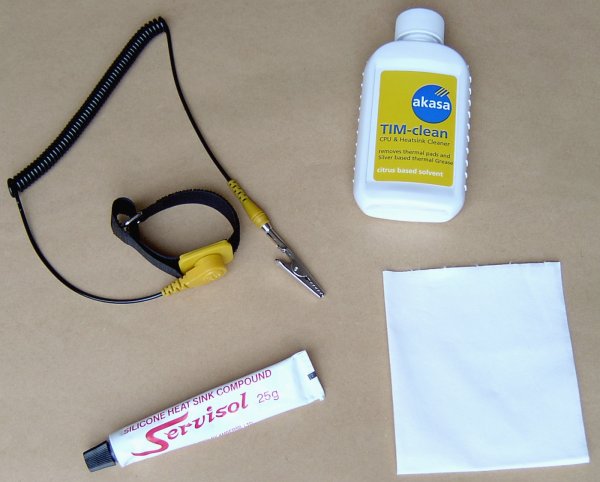
Tools

Its a matter of choice, but here we’re going to fit the CPU and heat sink before installing the motherboard into the system case.

Open the PGA370 processor socket by slightly moving the lever to the right and then raising it. The CPU and socket are keyed by having two diagonal – rather than right-angled – corners. Align these and insert the processor into the socket, taking care to ensure that all pins locate with the appropriate holes.
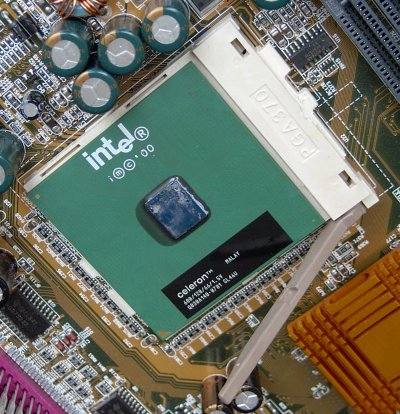
Celeron

Secure the processor by lowering the lever until it is in the locked position.


You may as well take the opportunity to configure your motherboard for the required system bus and CPU speed now.
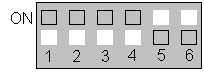
System

Reference to the Motherboard User’s Manual indicates that it is recommended that the system’s speed be set to Auto value, and that to accomplish this requires that the system bus speed DIP switch SW1, be set:
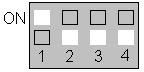
CPU

……… and the CPU speed DIP switch SW2, be set as follows for an Intel Celeron 600MHz processor:


The issue of PSU/motherboard compatibility has already been covered in this tutorial. The other major area of compatibility that may constrain your motherboard upgrade options is that of CPU interface.

Here, the track record of the two major processor manufacturers – Intel and AMD – could not have been more different. While the latter has stuck with the same Socket A format since the introduction of the second-generation Athlon (Thunderbird) processor in mid-2000, Intel has had several different CPU form factors – Socket 370/PPGA, FC-PGA, Socket 423 and Socket 478 – over the same period of time.

The situation is that there are three mainstream desktop processor interfaces presently in use:

  • Socket 370 for Intel Celeron CPUs
  • Socket 478 for Intel Pentium 4 CPUs, and
  • Socket A for AMD Duron and Athlon CPUs

the bottom line being that if you intend to use your existing processor in your new motherboard, then you’re unlikely to encounter any problems if its an AMD chip but need to proceed very carefully if it’s an Intel CPU!


  • Motherboard Upgrade Reasons
  • Motherboard Removal
  • Motherboard CPU
  • Motherboard Heatsinks
  • Motherboard Memory Identification
  • Motherboard Memory Installation
  • Motherboard Fit
  • Motherboard Power
  • Motherboard Panel
  • Motherboard Fan
  • Motherboard USB Ports
  • Motherboard FireWire Ports
  • Motherboard Audio
  • Motherboard Testing
  • Motherboard Floppy Connections
  • Motherboard IDE Connections
  • BIOS Settings
  • Motherboards and Win98
  • Motherboards and WinXP

Filed Under: How to Upgrade Your Motherboard

Latest Articles

Number Systems 4

At first glance all this switching between number systems (decimal, binary and hex) may not seem to be a help at all, but we've seen that only a very little effort can make it perfectly clear, not only in principle but also in practice. To enable you to get more practice, this interactive … [Read More...]

Coupcoup Malware Removal

Coupcoup is another adware application that is put out by JustPlugIt, and it is sure to annoy you as much as the other pieces of computer junk that is created with that software. If you find evidence of this on your PC, you will want to remove it as soon as possible despite the fact that it promises … [Read More...]

Safe Mode Editing

Repeat the same process as used previously to make a backup copy of the current boot.ini file. This time, however, when the file has been opened in Notepad... ... locate the [Operating Systems] section. Copy the entry beneath this that relates to your default operating system, and paste … [Read More...]

Everything You Need to Know About Sourcing Circuit Boards From U.S. Suppliers

In This Article This article includes: Why Source PCBs From the United States?How to Get a Quote From a U.S.-Based PCB ManufacturerThe Top U.S. … [Read More...]

Top Taplio Alternatives in 2025 : Why MagicPost Leads for LinkedIn Posting ?

LinkedIn has become a strong platform for professionals, creators, and businesses to establish authority, grow networks, and elicit engagement. Simple … [Read More...]

Shocking Cybercrime Statistics for 2025

People all over the world are becoming more concerned about cybercrime than ever. We have recently collected some statistics on this topic and … [Read More...]

Gaming Laptop Security Guide: Protecting Your High-End Hardware Investment in 2025

Since Jacob took over PC Tech Guide, we’ve looked at how tech intersects with personal well-being and digital safety. Gaming laptops are now … [Read More...]

20 Cool Creative Commons Photographs About the Future of AI

AI technology is starting to have a huge impact on our lives. The market value for AI is estimated to have been worth $279.22 billion in 2024 and it … [Read More...]

13 Impressive Stats on the Future of AI

AI technology is starting to become much more important in our everyday lives. Many businesses are using it as well. While he has created a lot of … [Read More...]

Guides

  • Computer Communications
  • Mobile Computing
  • PC Components
  • PC Data Storage
  • PC Input-Output
  • PC Multimedia
  • Processors (CPUs)

Recent Posts

How To Manage Windows Startup Items and Double The Speed Of Your Computer

Sometimes, when you turn on your computer, it seems that windows takes forever to start up. There are several causes for this problem but one of the … [Read More...]

FireWire 800 Interfaces

In early 2001 the battle between IEEE 1394 and USB advanced another step with the 1394 Trade Association's approval of … [Read More...]

HDCP Technology

High-Bandwidth Digital Content Protection is effectively a copy protection scheme designed to eliminate the possibility of intercepting … [Read More...]

[footer_backtotop]

Copyright © 2026 About | Privacy | Contact Information | Wrtie For Us | Disclaimer | Copyright License | Authors