pctechguide.com

  • Home
  • Guides
  • Tutorials
  • Articles
  • Reviews
  • Glossary
  • Contact

Testing the External DV Converter

To open Movie Maker, click Start > Programs > Accessories > Windows Movie Maker.

Select Capture from video device to launch the Video Capture Wizard.
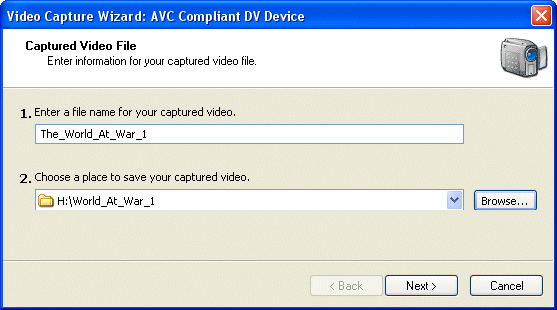
Name

Enter a name for the file you’re about to capture and a location where you wish to store it.
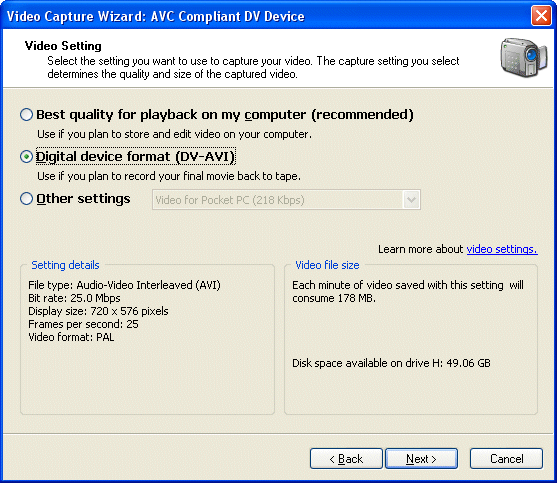
Select

Select the DV-AVI format …

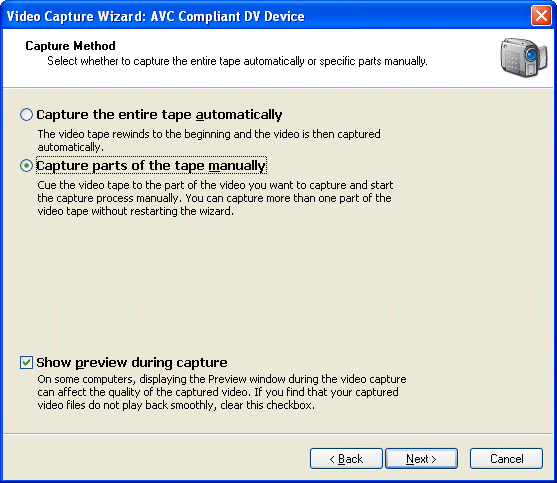
Capture

… and then the option to Capture parts of the tape manually.

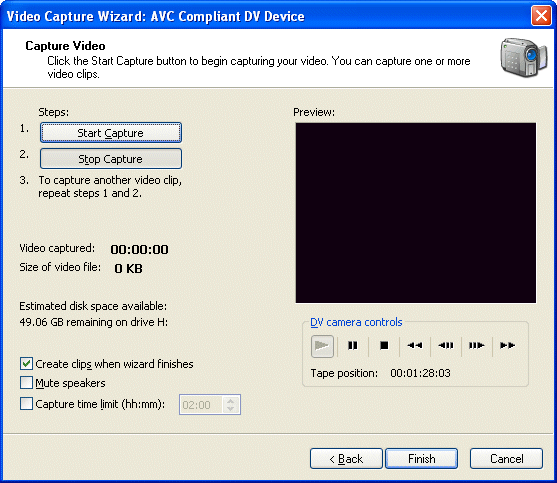
Start playing the video cassette tape on your VCR deck …
Start

… and use the Start Capture and Stop Capture buttons to determine the portion of video to be captured.

You can subsequently use Movie Maker to play the captured test portion of digitised video, to check the quality of both video and audio.

  • Transfer VHS to DVD Method
  • VCR to DVD – Video Digitisation and Compression Codecs
  • VCR to DVD Conversion – Video Capture Cards and PC Hardware
  • How to Transfer VCR Video to DVD – Preparation
  • Converting VCR Video to DVD Using Canopus ADVC-55
  • Connecting External DV Converter Hardware to VCR and PC for VHS Video to DVD Transfer
  • Testing the External DV Converter
  • Installing the Software for the ADVC-55 DV Converter – including NERO
  • One-Click Operation of VHS Video to DVD Transfer Using ADVC-55
  • Rip / Import / Copy VCR VHS Video and Burn to DVD with Nero
  • Labelling your DVDs – tutorial on how to transfer your VCR tapes to DVD

Filed Under: How to Transfer Your VCR Tapes to DVD Tagged With: PC to external DV testing, testing DV converter, Testing external DV converter

Latest Articles

RAID tutorial – installing the drivers

Now is the time to use the previously prepared floppy disk containing the RAID Controller driver software. Proceed as follows: Press F6 when invited to do so, to ...... install third party SCSI or RAID driver. Press S when invited to do so, to specify additional SCSI adapters, CD-ROM drives, … [Read More...]

Restarting After Fresh Windows Install

After Setup finishes copying the Windows 98 files to your computer, you are prompted to restart your computer. You can click the Restart Now button to restart your computer immediately; if you do not click the button or wait more than 15 seconds to click it, Setup restarts your computer … [Read More...]

UltraVNC for Remote Computer Access

Being able to access your computer remotely is a very useful feature. It allows you to travel light with a laptop, tablet, or even smart phone, but still be able to access your main computer back at your home or office. Then you can keep all of your important files and applications in one place and … [Read More...]

Everything You Need to Know About Sourcing Circuit Boards From U.S. Suppliers

In This Article This article includes: Why Source PCBs From the United States?How to Get a Quote From a U.S.-Based PCB ManufacturerThe Top U.S. … [Read More...]

Top Taplio Alternatives in 2025 : Why MagicPost Leads for LinkedIn Posting ?

LinkedIn has become a strong platform for professionals, creators, and businesses to establish authority, grow networks, and elicit engagement. Simple … [Read More...]

Shocking Cybercrime Statistics for 2025

People all over the world are becoming more concerned about cybercrime than ever. We have recently collected some statistics on this topic and … [Read More...]

Gaming Laptop Security Guide: Protecting Your High-End Hardware Investment in 2025

Since Jacob took over PC Tech Guide, we’ve looked at how tech intersects with personal well-being and digital safety. Gaming laptops are now … [Read More...]

20 Cool Creative Commons Photographs About the Future of AI

AI technology is starting to have a huge impact on our lives. The market value for AI is estimated to have been worth $279.22 billion in 2024 and it … [Read More...]

13 Impressive Stats on the Future of AI

AI technology is starting to become much more important in our everyday lives. Many businesses are using it as well. While he has created a lot of … [Read More...]

Guides

  • Computer Communications
  • Mobile Computing
  • PC Components
  • PC Data Storage
  • PC Input-Output
  • PC Multimedia
  • Processors (CPUs)

Recent Posts

DVD DivX Codec

DIVX is essentially a limited-use, pay-per-view DVD technology. Marketed as a more affordable DVD format - with the … [Read More...]

Website Builders Make Web Design Available to Everyone

The Internet is a powerful communication medium. It gives people the power to share their ideas, passions or business with millions of people. And, it … [Read More...]

CD-RW Installation Mounting

Make sure the power to your computer and any external peripherals are off and your computer is unplugged from its power source. If you haven't … [Read More...]

[footer_backtotop]

Copyright © 2026 About | Privacy | Contact Information | Wrtie For Us | Disclaimer | Copyright License | Authors