pctechguide.com

  • Home
  • Guides
  • Tutorials
  • Articles
  • Reviews
  • Glossary
  • Contact

Hard Drive Configuration

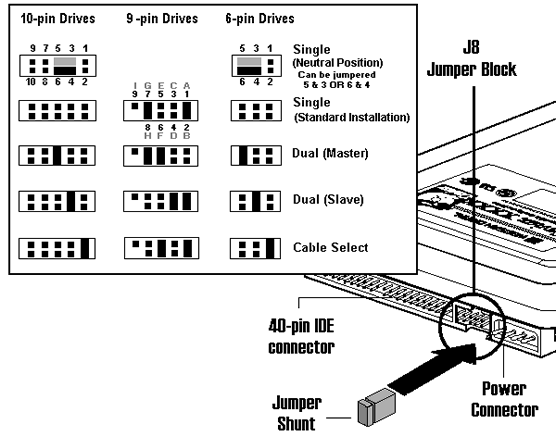
In fact, it’s not the particular IDE ribbon cable connector that determines whether or not a drive is a master or slave, but rather the way in which the drive’s jumper pins are configured. EIDE hard drives typically have a jumper block located between the 40-pin IDE connector and the power connector, on the rear of the drive. These jumpers select the physical detection options on the hard drive.

There’s often a sticker on top of the drive explaining the necessary jumper settings – as with the drive being used here. The information will also be present in the drive’s user manual.

Failing both those options, this page has links that’ll lead you to jumper settings for all of the principal hard disk drive manufacturers.

As it happens, both the existing drive and new drive relevant to this tutorial are made by the same manufacturer, and both need to be reconfigured for the new master/slave arrangement. The above-referenced page leads to a page on Western Digital’s web site with the information required to accomplish this:
Jumper

So, this information allows the existing 9-pin drive to be correctly reconfigured from a Single to a Dual (Master), and the new 10-pin drive to be reconfigured as a Dual (Slave).

  • Hard Drive Upgrade Reasons
  • Hard Drive Preperation
  • Hard Drive Planning
  • Hard Drive Configuration
  • Hard Drive Connection
  • Configuring BIOS for a Second Hard Drive – including SMART
  • Hard Drive Partitioning
  • Hard Drive Formating

Filed Under: How to Install a Second Hard Disk Drive

Latest Articles

How to Prevent a Virus Infection

Anybody who has ever been the victim of a computer virus knows that it affects more than your sanity; in some cases, a virus can ruin your computer beyond repair and cause you to shell out major dough for a new PC. Some viruses even hijack your personal information, causing even more money … [Read More...]

Graphic Card Display Port – History

Announced in May 2006, the new DisplayPort standard was developed by a VESA Task Group comprised of leading companies in the display silicon, connector, computer monitor, TV display, projector, and PC industry segments. Key objectives were to specify an open, licence-free … [Read More...]

Win98 Installation Planning

A clean install means that you're going to completely wipe your C: drive early in the procedure. You need to be sure that you've figured out how you'll subsequently reinstate everything you require to the system, both software and user data. Two types of software need to be considered, device … [Read More...]

Top Taplio Alternatives in 2025 : Why MagicPost Leads for LinkedIn Posting ?

LinkedIn has become a strong platform for professionals, creators, and businesses to establish authority, grow networks, and elicit engagement. Simple … [Read More...]

Shocking Cybercrime Statistics for 2025

People all over the world are becoming more concerned about cybercrime than ever. We have recently collected some statistics on this topic and … [Read More...]

Gaming Laptop Security Guide: Protecting Your High-End Hardware Investment in 2025

Since Jacob took over PC Tech Guide, we’ve looked at how tech intersects with personal well-being and digital safety. Gaming laptops are now … [Read More...]

20 Cool Creative Commons Photographs About the Future of AI

AI technology is starting to have a huge impact on our lives. The market value for AI is estimated to have been worth $279.22 billion in 2024 and it … [Read More...]

13 Impressive Stats on the Future of AI

AI technology is starting to become much more important in our everyday lives. Many businesses are using it as well. While he has created a lot of … [Read More...]

Graphic Designers on Reddit Share their Views of AI

There are clearly a lot of positive things about AI. However, it is not a good thing for everyone. One of the things that many people are worried … [Read More...]

Guides

  • Computer Communications
  • Mobile Computing
  • PC Components
  • PC Data Storage
  • PC Input-Output
  • PC Multimedia
  • Processors (CPUs)

Recent Posts

Use TRACERT to Diagnose Network Issues

Windows comes with several commands that help you diagnose network issues. But, one of the more useful commands available to you is the TRACERT … [Read More...]

LIMDOW Data Storage

Light Intensity Modulated Direct OverWrite technology uses a different write technology which significantly improves on … [Read More...]

SLI Technology

Unveiled in the summer of 2004, SLI (Scaleable Link Interface) is Nvidia's revolutionary approach to 3D graphics … [Read More...]

[footer_backtotop]

Copyright © 2026 About | Privacy | Contact Information | Wrtie For Us | Disclaimer | Copyright License | Authors