pctechguide.com

  • Home
  • Guides
  • Tutorials
  • Articles
  • Reviews
  • Glossary
  • Contact

Safe Mode Editing

Repeat the same process as used previously to make a backup copy of the current boot.ini file.

This time, however, when the file has been opened in Notepad…
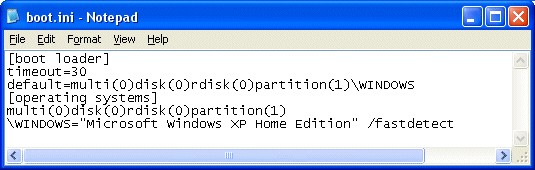
Open

… locate the [Operating Systems] section.

Copy the entry beneath this that relates to your default operating system, and paste it on the line below.

Add /safeboot:minimal /sos /bootlog to the end of the line you just copied. If you want networking support, then change minimal to network.
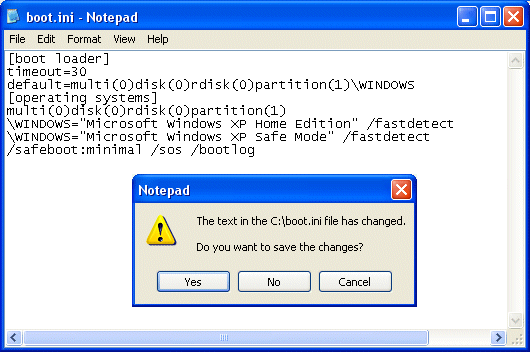
Edit

Close Notepad and save changes when prompted.

The next time you boot your system, Safe Mode will be present in the list of available options.
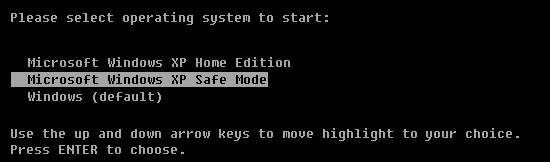
Safe

You can view the boot.ini file via the System Configuration Utility. To run this click Start > Run, enter msconfig.exe, click OK and select the BOOT.INI tab.

Relevant Microsoft Knowledge Base Articles

  • 315222: A description of the Safe Mode Boot options in Windows XP
  • 289022: HOW TO: Edit the Boot.ini File in Windows XP


  • Safe Mode Backup
  • Safe Mode Editing

Filed Under: How to Add Safe Mode to the Boot Loader Menu

Latest Articles

Writing A Term Paper as a Computer Science Major

There are a lot of different things that you have to deal with as a computer science major. You probably went into the major thinking that you could just write code all day without having to worry about writing term papers. Sadly, this is no the case. Virtually every computer science student will … [Read More...]

Motherboard IDE Connections

IDE connectors, like floppy drive and other connectors, are keyed to ensure proper connection. Connect your IDE devices to the motherboard IDE connectors, taking care to assign these to give optimal performance for your particular system configuration. Although a single IDE channel can … [Read More...]

Technology Comparison

The table below compares the four home networking technologies described previously, identifying some of the important factors to consider in selecting a solution: Phoneline Powerline Ethernet Wireless Speed 100 Kbit/s - 10 Mbit/s 50 Kbit/s - 350 … [Read More...]

Top Taplio Alternatives in 2025 : Why MagicPost Leads for LinkedIn Posting ?

LinkedIn has become a strong platform for professionals, creators, and businesses to establish authority, grow networks, and elicit engagement. Simple … [Read More...]

Shocking Cybercrime Statistics for 2025

People all over the world are becoming more concerned about cybercrime than ever. We have recently collected some statistics on this topic and … [Read More...]

Gaming Laptop Security Guide: Protecting Your High-End Hardware Investment in 2025

Since Jacob took over PC Tech Guide, we’ve looked at how tech intersects with personal well-being and digital safety. Gaming laptops are now … [Read More...]

20 Cool Creative Commons Photographs About the Future of AI

AI technology is starting to have a huge impact on our lives. The market value for AI is estimated to have been worth $279.22 billion in 2024 and it … [Read More...]

13 Impressive Stats on the Future of AI

AI technology is starting to become much more important in our everyday lives. Many businesses are using it as well. While he has created a lot of … [Read More...]

Graphic Designers on Reddit Share their Views of AI

There are clearly a lot of positive things about AI. However, it is not a good thing for everyone. One of the things that many people are worried … [Read More...]

Guides

  • Computer Communications
  • Mobile Computing
  • PC Components
  • PC Data Storage
  • PC Input-Output
  • PC Multimedia
  • Processors (CPUs)

Recent Posts

Cyrix 6×86 CPU – the first Pentium compatible processor

Unveiled in October 1995, the 6x86 was the first Pentium-compatible processor to reach the market and the result of a collaboration with IBM's … [Read More...]

Breaking Down the Costs of Developing a Custom VR Solution

Virtual Reality (VR) technology is leading to a number of changes in every industry, including healthcare and entertainment. However, it can be very … [Read More...]

DVDs – digital versatile disks – how they’re made and how they work

At first glance, a DVD disc can easily be mistaken for a CD: both are plastic discs 120mm in diameter and 1.2mm thick and both rely on lasers to … [Read More...]

[footer_backtotop]

Copyright © 2026 About | Privacy | Contact Information | Wrtie For Us | Disclaimer | Copyright License | Authors