Launched at Computex in the summer of 2005, ATI launched their own tandem graphics card solution, branded CrossFire, and comprising the following components:
- Radeon CrossFire Edition graphics card with Compositing Engine
- Secondary PCI Express graphics card with Radeon X800 or X850 series GPU
- CrossFire Ready motherboard with dual PCI Express graphics slots
- CrossFire driver support.
Unlike SLI, the two graphics cards in a CrossFire system do not have to be identical, and they have an exterior connection rather than an interior one. Moreover, only the master card needs to be a CrossFire device. This can be paired with any Radeon X850 or X800 card, making the ATI technology a viable upgrade option for many existing systems.
In a CrossFire system, each GPU has its own dedicated PCI Express link to the Northbridge of the motherboard chipset, and is allocated its own command buffer and non-local storage space in system memory. Allocating separate command buffers allows each GPU to be assigned its own unique set of tasks.
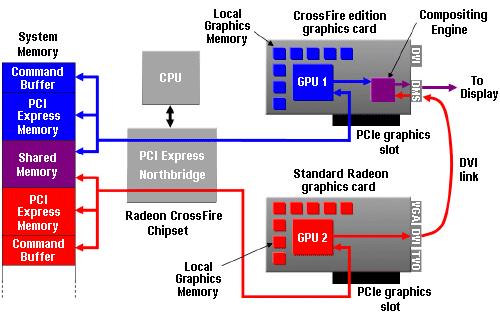
Another portion of system memory is set aside for sharing of data between the GPUs. Shared data includes synchronisation commands, textures, off-screen buffers, and other temporary data generated during the rendering process. This configuration takes advantage of the high speed bi-directional PCI Express links to ensure smooth, efficient co-operation between the GPUs.
When each GPU has completed its assigned tasks for a given frame, the resulting outputs are sent to the CrossFire Compositing Engine. This device combines the results from each GPU according to the selected operating mode, and sends the final frames out to the display device. It is capable of performing advanced blending operations without burdening either of the GPUs.
The key to maximising the speed of a multi-GPU system is to divide the rendering workload of each frame as efficiently as possible. It is also important to minimise any performance overhead caused by additional driver processing or synchronisation between the GPUs, while maintaining compatibility with a wide range of applications. To achieve this, the CrossFire driver chooses the most appropriate of the following three techniques to divide the rendering workload for each particular 3D application:
- Alternate Frame Rendering (AFR); where all even frames are rendered on one GPU, while all odd frames are rendered on the other.
- Supertiling; which works by dividing each frame to be rendered into a number of tiles in an alternating checkerboard pattern, such that half of the tiles are assigned to each of the two GPUs, and
- Scissor; a similar process to that used by Nvidia’s SLI technology, in which each frame is split into two sections, with each being processed by one GPU.
CrossFire also supports a quality-oriented mode (Super AA), which exploits the additional processing power of a multi-GPU system to provide an even higher quality anti-aliasing capability.
- How Do Computers Make Pictures?
- Graphic Card Resolution
- Graphic Card Colour Depth
- Graphic Card Components
- Graphic Card Memory
- Graphic Card Driver Software
- 3d Accelerated Graphic Cards
- Graphic Card Geometry
- 3D Rendering
- FSAA Graphic Card Technology
- Digital Graphic Cards
- DVI Graphic Cards
- HDCP Technology
- Graphic Card HDMI Ports
- Graphic Card Display Port
- Unified Display Special Interest Group
- DirectX
- OpenGL technology
- Direct3D
- Talisman
- Fahrenheit Graphic Cards
- SLI Technology
- CrossFire Graphic Cards