pctechguide.com

  • Home
  • Guides
  • Tutorials
  • Articles
  • Reviews
  • Glossary
  • Contact

Dual Channel DDR Memory

The terminology dual-channel DDR is, in fact, a misnomer. The fact is there’s no such thing as dual-channel DDR memory. What there are, however, are dual-channel platforms.

When properly used, the term dual channel refers to a DDR motherboards chipset that’s designed with two memory channels instead of one. The two channels handle memory-processing more efficiently by utilising the theoretical bandwidth of the two modules, thus reducing system latencies, the timing delays that inherently occur with one memory module. For example, one controller reads and writes data while the second controller prepares for the next access, hence, eliminating the reset and setup delays that occur before one memory module can begin the read/write process all over again.

Consider an analogy in which data is filled into a funnel (memory), which then channels the data to the CPU.

Single-channel memory would feed the data to the processor via a single funnel at a maximum rate of 64 bits at a time. Dual-channel memory, on the other hand, utilises two funnels, thereby having the capability to deliver data twice as fast, at up to 128 bits at a time. The process works the same way when data is emptied from the processor by reversing the flow of data. A memory controller chip is responsible for handling all data transfers involving the memory modules and the processor. This controls the flow of data through the funnels, preventing them from being over-filled with data.
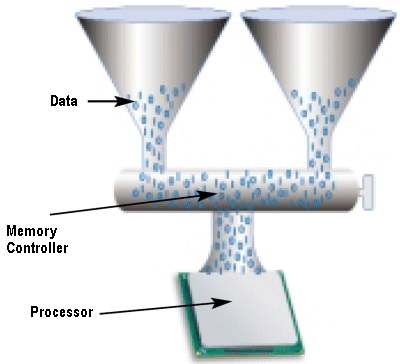
Dual-channel

It is estimated that a dual-channel memory architecture is capable of increasing bandwidth by as much as 10%.

The majority of systems supporting dual-channel memory can be configured in either single-channel or dual-channel memory mode. The fact that a motherboard supports dual-channel DDR memory, does not guarantee that installed DIMMs will be utilised in dual-channel mode. It is not sufficient to just plug multiple memory modules into their sockets to get dual-channel memory operation – users need to follow specific rules when adding memory modules to ensure that they get dual-channel memory performance. Intel specifies that motherboards should default to single-channel mode in the event of any of these being violated:

  • DIMMs must be installed in pairs
  • Both DIMMs must use the same density memory chips
  • Both DIMMs must use the same DRAM bus width
  • Both DIMMs must be either single-sided or dual-sided.

DDR SDRAM DIMMs have 184 pins (as opposed to 168 pins on SDRAM, or, 240 pins on DDR2 SDRAM), and can be differentiated from SDRAM DIMMs by the number of notches (DDR SDRAM has one, SDRAM has two).

  • What is Level 1 (L1) Cache Memory?
  • What is L2 (Level 2) cache memory?
  • RAM or Main Memory – PC / computer memory (DIMM, DRAM, SDRAM)
  • DRAM – Dynamic Random Access Memory
  • FPM DRAM
  • EDO (Extended Data Out) and BEDO (Burst Extended Data Out) DRAM
  • SDRAM
  • PC133 SDRAM
  • DDR SDRAM explained
  • DDR2 DRAM
  • Dual Channel DDR Memory
  • 1T SRAM
  • Direct DRAM
  • SIMMs
  • DIMM Memory
  • RIMMs Memory
  • Memory Presence Detection
  • Parity Memory
  • ECC Memory
  • Memory Upgrades
  • The Evolution of Memory
  • Flash Memory
  • Magnetic RAM

Filed Under: Computer Memory

Latest Articles

A Cool Computer– Fans and Overclocking

Heat and computers do not get along. A cool computer runs more smoothly and efficiently. A computer that can not rid itself of heat properly can actually underperform and over a long period of time it can result in damage to the computer. This can significantly shorten the lifespan of the computer. … [Read More...]

On the Go With Microsoft Office

If you have a tablet with Windows 10 installed, you are in for an extra bonus. Microsoft unveiled its new Office Mobile applications. These include the mobile versions of popular Office applications like Excel, Word, Powerpoint and OneNote. Users will now be able to easily edit documents with the … [Read More...]

Floppy Installation Connection

A floppy disk drive's connectors are at the back of the unit. Controller connector: The floppy drive connector looks similar to a 40-pin IDE connector, but is a little smaller with a pin count of 34. However, as with an IDE cable, the convention is for Pin 1 on the connector to … [Read More...]

Comments

  1. Om445 says

    October 15, 2011 at 3:16 am

    thnk U…

Top Taplio Alternatives in 2025 : Why MagicPost Leads for LinkedIn Posting ?

LinkedIn has become a strong platform for professionals, creators, and businesses to establish authority, grow networks, and elicit engagement. Simple … [Read More...]

Shocking Cybercrime Statistics for 2025

People all over the world are becoming more concerned about cybercrime than ever. We have recently collected some statistics on this topic and … [Read More...]

Gaming Laptop Security Guide: Protecting Your High-End Hardware Investment in 2025

Since Jacob took over PC Tech Guide, we’ve looked at how tech intersects with personal well-being and digital safety. Gaming laptops are now … [Read More...]

20 Cool Creative Commons Photographs About the Future of AI

AI technology is starting to have a huge impact on our lives. The market value for AI is estimated to have been worth $279.22 billion in 2024 and it … [Read More...]

13 Impressive Stats on the Future of AI

AI technology is starting to become much more important in our everyday lives. Many businesses are using it as well. While he has created a lot of … [Read More...]

Graphic Designers on Reddit Share their Views of AI

There are clearly a lot of positive things about AI. However, it is not a good thing for everyone. One of the things that many people are worried … [Read More...]

Guides

  • Computer Communications
  • Mobile Computing
  • PC Components
  • PC Data Storage
  • PC Input-Output
  • PC Multimedia
  • Processors (CPUs)

Recent Posts

RegGenie Review

PROS: RegGenie scans computer systems fast and detects invalid entries accurately for various computer systems. It's a basic registry cleaning program … [Read More...]

OLED Flat Panels – Explain oled

Many electronic appliances are at the threshold of a revolution that began with the discovery of polymeric conductors in the 1970s. Polymeric … [Read More...]

Resolve Omiga-Plus Redirect Issue

Alternating homepage or start page is one to capabilities of Omiga-Plus, which is the reason it is popularly known to be one of the browser hijackers. … [Read More...]

[footer_backtotop]

Copyright © 2026 About | Privacy | Contact Information | Wrtie For Us | Disclaimer | Copyright License | Authors